
Resize with fit, cover, and crop position
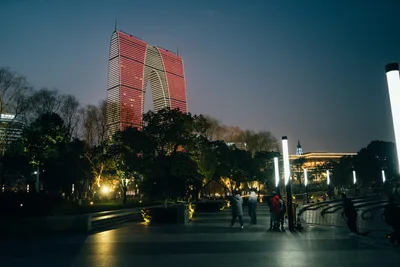
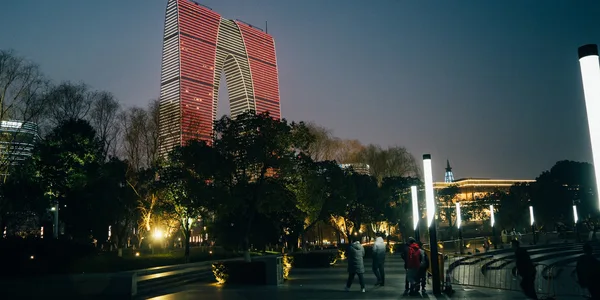
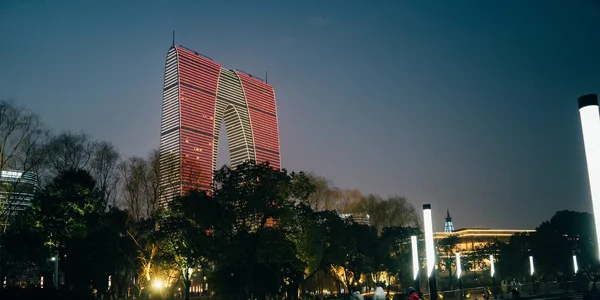
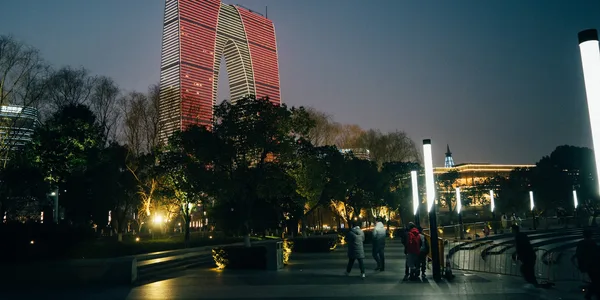
A resize starts by choosing the canvas, then the crop. fit inside places the whole frame inside 400 × 400 without enlargement. cover fills 600 × 300. This landscape frame then loses a strip from the top or bottom. The kept region can be the centre, the top edge, or a high-entropy area. A square cover would only crop the sides, so north would not move the frame. The wider target makes the top crop visible.
The fixed-coordinate crop and arbitrary rotation in the geometry bundle are a different page: resize, crop, rotate, and flip.

Four canvases
Section titled “Four canvases”The reference images come from govips v2.19.0 thumbnail loading on libvips 8.17.3, WebP quality 82, with enlargement disabled. north is libvips crop=low. On this wider target the crop is vertical, so the low coordinate keeps the top. sharp expresses the same product intent with position: "north".
if err := vips.Startup(nil); err != nil { return err }defer vips.Shutdown()
write := func(name string, width, height int, crop vips.Interesting) error {    image, err := vips.NewThumbnailWithSizeFromFile("input.jpg", width, height, crop, vips.SizeDown)    if err != nil { return err }    defer image.Close()    params := vips.NewWebpExportParams()    params.Quality = 82    data, _, err := image.ExportWebp(params)    if err != nil { return err }    return os.WriteFile(name, data, 0o644)}if err := write("fit-inside.webp", 400, 400, vips.InterestingNone); err != nil { return err }if err := write("cover-centre.webp", 600, 300, vips.InterestingCentre); err != nil { return err }if err := write("cover-north.webp", 600, 300, vips.InterestingLow); err != nil { return err }return write("cover-entropy.webp", 600, 300, vips.InterestingEntropy)
const jobs = [ ['fit-inside.webp', { width: 400, height: 400, fit: 'inside', withoutEnlargement: true }], ['cover-centre.webp', { width: 600, height: 300, fit: 'cover', position: 'centre', withoutEnlargement: true }], ['cover-north.webp', { width: 600, height: 300, fit: 'cover', position: 'north', withoutEnlargement: true }], ['cover-entropy.webp', { width: 600, height: 300, fit: 'cover', position: 'entropy', withoutEnlargement: true }],];for (const [name, resize] of jobs) { await sharp('input.jpg').resize(resize).webp({ quality: 82 }).toFile(name);}jobs = [ ("fit-inside.webp", "none", 400, 400), ("cover-centre.webp", "centre", 600, 300), ("cover-north.webp", "low", 600, 300), ("cover-entropy.webp", "entropy", 600, 300),]for name, crop, width, height in jobs: image = pyvips.Image.thumbnail("input.jpg", width, height=height, size="down", crop=crop) image.write_to_file(name, Q=82)vips thumbnail input.jpg 'fit-inside.webp[Q=82]' 400 --height 400 --size down --crop nonevips thumbnail input.jpg 'cover-centre.webp[Q=82]' 600 --height 300 --size down --crop centrevips thumbnail input.jpg 'cover-north.webp[Q=82]' 600 --height 300 --size down --crop lowvips thumbnail input.jpg 'cover-entropy.webp[Q=82]' 600 --height 300 --size down --crop entropyWhere the bindings diverge
Section titled “Where the bindings diverge”Fit is 400 × 267. Each cover is 600 × 300. All four are 3-band images without alpha. sharp uses its bundled libvips 8.18.7; the other three use 8.17.3. An entropy crop depends on image content, so one run does not define a fixed window.
Whether a large thumbnail can stay on a sequential path depends on the access mode. See sequential access, random access, and materialisation.